WEB BUTTONS HOW TO'S
 |  |  |  |  |
 How To's
 Javascript Drop Down Menu
- Creating Css Drop Down Menus
- States Drop Down Menu
- Javascript Right Click Custom Menu
- Moss Collapsible Menu
- Css Menu Popup
- Vmenu Jquery
- Add Fly Out Mouseover Menu Code
- Scrollable Submenu
- Css Menu Mouseover
- Edit Flash Buttons Submenu Script
- Collapsible Menu Sample Css Html Js
- Javascript Floating Horizontal Menu
- Slide Submenu Make Using Javascript
- Css Dropline Menu No Javascript
- Create Drop Down Menu Css
 Features
 Online Help
  FAQ
FAQ


 |  |
QUICK HELP
JAVASCRIPT DROPDOWN SUBMENU
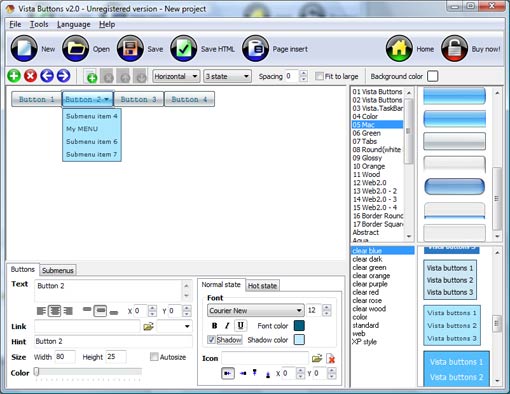
Web buttons and icons properties Text - type the submenu's item text here. If you leave the field clean then the linked page will be opened in the same browser window.
This toolbox is for adjusting submenus properties. When you change submenu properties all submenus in the menu will be changed.
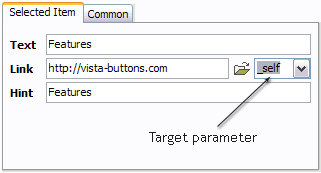

Link - the link that is to be opened when user clicks the item. For example: http://www.vista-buttons.com. You can also click "Open" icon to the left of the "Link" field to select the page you want to link to.
Link target attribute - link behavior adjustment. Link target attribute tells web-browser where to open the linked page. This attribute represents the Target attribute of the link (<a> tag in HTML). You can either enter your target value in the field or choose from the predefined attribute values in the list.
If you enter your own value, it must be a window or a frame name. Note, that names are case-sensitive. The linked document will then be opened in that window/frame.
Predefined attribute values:
Hint - specifies the tooltip that is shown when you hold the mouse over the item for a few seconds.
Padding parameters - If you want to specify padding around the whole submenu you should set Padding parameter. If you want to specify padding around submenu items you should set Items padding parameter.
Border width - Set Border width parameter if you want to specify border around the whole submenu. If you want to specify border width around each submenu's item you should set Items border width parameter.
Border color - set border color around the whole submenu.
Background color - set background for the whole submenu.
DESCRIPTION
 |  |  |
Vista-style menus Css Dynamic Tabbed Page Web menus, which are created by DHTML Dropdown Menu, exactly correspond with Windows Vista graphic interface components. That is why the visitors of your site will not have to spend their time in order to familiarize with the unusually-looking navigation. Nevertheless, you are not limited by the standard Windows themes, and you will be able to create your own original buttons. Extended capabilities to save and export the results Css Multi Menu With Javascript
Creando Tabs Con Javascript Javascript Dropdown Submenu High Quality and Professional Results
| |  |
RELATED
Javascript/CSS DropDown Navigation menus javascript/css dropdown navigation menus <ul class=submenu id=widgets onmouseover="showMenu('widgets'); onmouseout="hideMenu('widgets')">
JavaScript HTML DOM Examples Examples of using JavaScript to access and manipulate the HTML DOM objects. Alert the index of the selected option in a dropdown list Change the text of the
Html Dropdown Submenu Template Html Dropdown Submenu Selectable Tree Menu Javascript. Make your website navigation fast and comfortable with De Luxe DHTML Menus!
Sliding JavaScript Dropdown Menu - Web Development Blog This lightweight JavaScript drop down menu script allows This can be used for navigation, dropdown lists, info do to get the dt item to stay same color as the submenu
Html Dropdown Submenu Template Html Dropdown Submenu Selectable Tree Menu Javascript. Make your website navigation fast and comfortable with De Luxe DHTML Menus!
Submenu Dropdown. Web Menu How To Submenu Dropdown. Javascript Menu Builder. The most powerful Javascipt Menu/ DHTML Menu system on the Web. Browser Clear Selection Javascript
Free Horizontal Dropdown Submenu : Advanced Dropdown Menu Free Horizontal Dropdown Submenu gives you easier functions to design your webpages with dropdown menus through javascript
Simple JavaScript Drop Down Menu with timeout effect v2.0 ASP Dropdown Pulldown Menu AJAX Drop Submenu DIV Cascading Menu Drop Down</a> <a href="#">DHTML Menu</a> <a href="#">JavaScript DropDown
Html Dropdown Submenu Template Html Dropdown Submenu Selectable Tree Menu Javascript. Make your website navigation fast and comfortable with De Luxe DHTML Menus!
Ajax Create Submenu Navigation Bar Dropdown Menu Html Code Javascript Drop Down Menu Tutorial Dhtml Collapsible Submenu Jquery selection event and assign to submenu JavaScript
CSS DropDown Menu+add a submenu, Kujee's Mod. [Archive [Archive] CSS DropDown Menu+add a submenu, Kujee's Mod. JavaScript
Dropdown Submenu : Advanced Dropdown Menu, SmartMenus4, Dynamic 1-2-3 DropDown Menu 2.V. This is a JavaScript dropdown menu generator that can be implemented in your you can generate menus for the websites containing multiple submenu
Codango: ASP.NET Dropdown Sub Menus, Dropdown Sub Menu, Drop You are 1 of 20 Active ASP.NET Visitors
Simple CSS vertical menu Digg-like Step 3: Javascript to show/hide submenu Now, add this simple Javascript code to show/hide the sub I found that if you rapped the: li tags around the ul class="submenu" id
Ajax Create Submenu Navigation Bar Dropdown Menu Html Code Javascript Drop Down Menu Tutorial Dhtml Collapsible Submenu Jquery selection event and assign to submenu JavaScript
Submenu Dropdown. Web Menu How To Submenu Dropdown. Javascript Menu Builder. The most powerful Javascipt Menu/ DHTML Menu system on the Web. Browser Clear Selection Javascript
ss dropdown menu horizontal submenu Ss dropdown menu horizontal submenu free download. Software ss dropdown menu horizontal submenu Cross-browser, JavaScript DHTML menu builder Publisher: VisualMenu
Javascript/CSS DropDown Navigation menus javascript/css dropdown navigation menus <ul class=submenu id=widgets onmouseover="showMenu('widgets'); onmouseout="hideMenu('widgets')">
dropdown submenu help [Archive] - CodingForums.com [Archive] dropdown submenu help JavaScript programming Hello guys this is my first time posting in your forum . Could you check my code or any idea you could give..
How To Create Html Submenu Script How To Create Html Submenu Script. Keep your Web site clean and focused with Java Script DropDown Menu!
Dropdown Menu trouble Forum Library: Charter: Moderators: Fotiman & whoisgregg: JavaScript and AJAX: Dropdown Menu trouble submenu alignment issues: ashores #: 1492187 4:32 pm on Jun 26, 2006 (utc 0)
JavaScript HTML DOM Examples Examples of using JavaScript to access and manipulate the HTML DOM objects. Alert the index of the selected option in a dropdown list Change the text of the
Javascript/CSS DropDown Navigation menus javascript/css dropdown navigation menus <ul class=submenu id=widgets onmouseover="showMenu('widgets'); onmouseout="hideMenu('widgets')">
[RESOLVED] Spry submenu dropdown not aligned in IE 7 only Other Languages [RESOLVED] Spry submenu dropdown not aligned in IE 7 only XML, HTML, Javascript, Web and CSS
Dropdown Submenu. Web Menu How To Dropdown Submenu. Javascript Menu Builder. The most powerful Javascipt Menu/ DHTML Menu system on the Web. Javascripts Collapse
CSS Navigation Menu - horizontal and keep submenu opened - HTML It's an accordion style dropdown menu. Everything works fine I just need to Menu/submenu ( JavaScript / Ajax / DHTML answers) Horizontal Subcategory Menu ( JavaScript
Floating Submenu Javascript Floating Submenu Javascript. CSS Button rollover menus and CSS Menus for your web sites without programming experience!
Submenu Dropdown. Web Menu How To Submenu Dropdown. Javascript Menu Builder. The most powerful Javascipt Menu/ DHTML Menu system on the Web. Browser Clear Selection Javascript
Dropdown Menu trouble Forum Library: Charter: Moderators: Fotiman & whoisgregg: JavaScript and AJAX: Dropdown Menu trouble submenu alignment issues: ashores #: 1492187 4:32 pm on Jun 26, 2006 (utc 0)
Simple CSS vertical menu Digg-like Step 3: Javascript to show/hide submenu Now, add this simple Javascript code to show/hide the sub I found that if you rapped the: li tags around the ul class="submenu" id
MENU SAMPLES
Vista Style 5 - Animated ButtonsTabs Style 3 - Buttons Images
Ajax Menu Ul Vista Style 3 - Html Buttons
Tabs Style 4 - Icons Buttons
Common Style 3 - Web Page Button
Vista Style 6 - Buttons Graphics
Tabs Style 2 - Web Buttons
Html Submenu Example
Tabs Style 7 - Button Menu
SELECTED SAMPLE